
Eaton PT2HK-B-P Color Change Kit - Accell Hour Timer
Part Number: PT2HK-B-P
Quick Summary
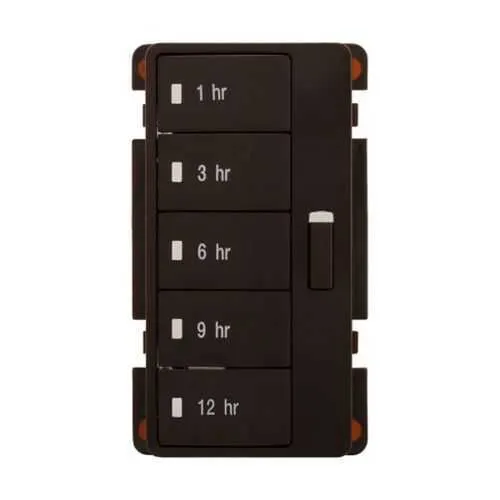
Eaton PT2HK-B-P lighting color change kit enables color switching for Accell hour timers in control panels. Mismatched indicators slow responses and raise risk during high-demand shifts. Certification details vary; confirm CE, UL, or other approvals with the manufacturer. By enabling clear visual status and simple faceplate customization, this kit improves operator efficiency, reduces downtime, and strengthens standardization across industrial automation projects.
Product Information
Extended Description
PT2HK-B-P Eaton: Eaton lighting color change kit, Accell hour timer (1, 3, 6, 9, 12), Brown
Product Name
Eaton lighting color change lit
Catalog Number
PT2HK-B-P
UPC
032664721144
Product Length/Depth
2.25 in
Product Height
4.38 in
Product Width
2.88 in
Product Weight
1 lb
Certifications
Contact Manufacturer
Special features
Accell hour timer (1, 3, 6, 9, 12)
Type
Color change kit
Color
Brown
How to change the faceplate color on your Eaton timer
Eaton Specification Sheet - PT2HK-B-P
Eaton Specification Sheet - PT2HK-B-P
Feature: Color change capability aligns control panel indicators with current process status. Benefit: Improves operator situational awareness, reducing misreads and enabling faster decision making in automated lines. Application: Suitable for machine control panels and process automation environments where timer-driven actions require immediate, unambiguous feedback. The impact is measurable in reduced alarms and shorter changeover times. Feature: Brown faceplate color integrates with existing panel aesthetics and reduces visual clutter. Benefit: Streamlines maintenance routines and minimizes retraining needs for technicians. Application: Ideal for retrofits and new installations in manufacturing cells that demand cohesive color coding across devices. Feature: Access to installation resources (How to change the faceplate color video and Eaton datasheets). Benefit: Accelerates commissioning, lowers setup labor costs, and supports standardization. Application: Quick reference during onboarding and site commissioning to avoid errors. Feature: Compact dimensions and weight (2.25 in depth, 4.38 in height, 2.88 in width, 1 lb). Benefit: Fits tight enclosures and preserves panel real estate while maintaining robust visibility. Application: Environments with space constraints or retrofits where adding indicators must be space-efficient. Feature: Certifications notes indicate manufacturer confirmation. Benefit: Encourages proactive compliance planning and reduces risk by verifying approvals before deployment. Application: Projects governed by regulatory or customer-specified certification requirements. These features collectively enable a reliable, visually consistent panel presence, compatible with existing Eaton timer ecosystems and other automation components.
Get a Quick Quote for a Eaton PT2HK-B-P
Chat with us on WhatsApp - fast responses guaranteed
Need to speak with someone? We'll call you back within 2 hours during business hours
Interested in Eaton PT2HK-B-P?
Enquire Now
FAQs
To install, power down the panel, remove the existing faceplate, and detach the timer module as required. Install the PT2HK-B-P color change kit in the same location, connect any required wiring as per the Eaton specification sheet, and reassemble. Consult the How to change the faceplate color on your Eaton timer video for step by step guidance and verify catalog number PT2HK-B-P during configuration.
A brown color change faceplate provides a distinct, stable indicator that reduces misreadings under varied lighting. It supports standardization across multiple machines, simplifies training, and accelerates fault isolation by aligning visible status with timer-driven events. This minimizes operator errors and supports quicker troubleshooting in high-volume manufacturing environments.
Certification details for PT2HK-B-P vary by region and application. Always confirm CE, UL, or other approvals with the manufacturer and review the Eaton specification sheet and local regulatory requirements before deployment. If approvals are in progress, plan for any additional validation steps during commissioning to maintain project schedules.
Yes. Clear, color-coded indicators reduce misreads and incorrect actions, leading to fewer alarms and faster fault verification. The standardized faceplate color simplifies replacement and routine maintenance, which lowers card and panel downtime costs. In addition, accessing the provided video and datasheets shortens onboarding time for maintenance staff.
Resources include the How to change the faceplate color on your Eaton timer video and Eaton specification sheets for PT2HK-B-P. Use these documents during installation, validation, and future maintenance to ensure correct wiring, compatibility with Accell hour timers, and alignment with panel standards. For ongoing support, contact Eaton for certification specifics and additional guidance.